30 September 2005

Control the host name/port ID when VS.Net or DevEnv load a web app

Stable build and integration build cannot host by a single machine. It is all due to when IIS and VS.NET creates a web app it always creates it in default location - local host.

The background:
W2k3, IIS6, .NET, SQL Server

Prove it 1. using vs.net

Using vs.net to open a web app which is configured to run at port 8080, notice it complains cannot find the web app at localhost(80) and tries to create one. I am sure you are familiar with the ‘smart way’ IIS and VS.net tries to recreate XXXXX_1 web app for you. Same thing here.

Prove it: 2 using DevEnv.exe
Here comes the long story:
On the CI build server, two web apps (part of the solution; both set to vdir in IIS) is hosted by the default web app (localhost:80). This config works fine with CC.net and Nant. Web apps can be built and tested properly.

Now on the same build server, I would like to have an independent nightly build process using CC.net.

From file system, the entire nightly build solution is a sibling to the CI build solution.
I create a new (IIS) Application pool – just to have a clean cut from the default application pool;
I create a NightlyBuild web App in this App pool, and I config the two web apps to map to their directories in nightly build solution. So they are symmetrical to the CI build settings. And I assign port 8081 to NightlyBuild web app.

Launch the Nant build process. Everything seemed worked fine. The build report actually says it. But when looking into the web apps. Source codes are fresh from source safe (check timestamp). However, there are no bin folders there. It looked like they are not built at all.

Turn to the CI build solution, there are bin folders. Then look up binaries. I was expecting the timestamp being older – when they are lastly built. Hi Presto, it is the timestamp of NightlyBuild’s.

See what I mean?

When start VS.net IDE or use DevEnv. It will always try to register the web app in http://localhost(:80) without any exception.

I wonder if there is a way I can intervene into this by Nant. So I can control the web app to be mapped to, say localhost:8080?

22 September 2005

Loading Xml Serialization Object Graph

A memo on using XmlSerializer.Serialize and loading the object graph:
1) use default XmlTextWriter
2) provide StringWriter to control the xml output format
3) use MemoryStream to control encoding
4) by lazy, use Console.Out to check the output on screen

There are quite a few ways to stream out the XmlSerializer marshalling result depends on the need.

How XmlSerializer.Serialize works?


1. XmlSerializer xs = new XmlSerializer(typeof(Foo));
2. xs.Serialize(..., aFoo);

On excuting the second line, our serializer then tries to serialize aFoo to Foo type. If Foo implements IXmlSerializable, it will ingore all public properties and just execute WriterXml that Foo implemented.
By default, serializer passes an object of XmlTextWriter to WriterXml. In your WriterXml implementation, you should never close the Writer. This should be left to the caller (XmlSerializer in our case).

How to serialize an object and load the marshalled result (object graph)?
The most common way is use the default XmlTextWriter
However, the xml document gererated is nicely formatted - i.e. indented. If a custom control over the format is needed, you need to passed your XmlTextWriter object to Serializer

1. XmlSerializer xs = new XmlSerializer(typeof(Foo));
2. using (StringWriter sw = new StringWriter())
3. {
4. XmlTextWriter xtwriter =new XmlTextWriter(sw);
5. xtwriter.Formatting = Formatting.None;
6. xs.Serialize(xtwriter, item.Reviews);
7. Console.WriteLine(sw.ToString());
8. }

As seen, we have a control over on the xml doc layout by specified Formatting style.
Not everthing can be controlled if use StringWriter though. It is Unicode base, so unless you override (or hijack?) StringWriter, you will always see utf-16 encoding

To specify which Encoding style to use, you need to use MemoryStream instead

1. XmlSerializer xs = new XmlSerializer(typeof(Foo));
2. using (MemoryStream ms = new MemoryStream())
3. {
4. XmlTextWriter xtwriter =new XmlTextWriter(ms, Encoding.UTF8);
5. xtwriter.Formatting = Formatting.None;
6. xs.Serialize(xtwriter, aFoo);
7. xtwriter.Flush();
8. ms.Position = 0;
9. XmlDocument doc = new XmlDocument();
10. doc.Load(new MemoryStream(ms.GetBuffer()) );
11. }

And simplified version without encoding or style:

1. XmlSerializer xs = new XmlSerializer(typeof(Foo));
2. using (MemoryStream ms = new MemoryStream())
3. {
4. xs.Serialize(ms, item.Reviews);
5. XmlDocument doc = new XmlDocument();
6. doc.Load(new MemoryStream(ms.GetBuffer()) );
7. Console.WriteLine(doc.OuterXml);
8. }

And finally, just be lazy - use Console.Out gives you a quick peek on what is produced:

1. XmlSerializer xs = new XmlSerializer(typeof(Foo));
2. xs.Serialize(Console.Out, aFoo);

16 September 2005

Automated SQL Server database objects scripting and deployment in continuous integration environment


The initiatives

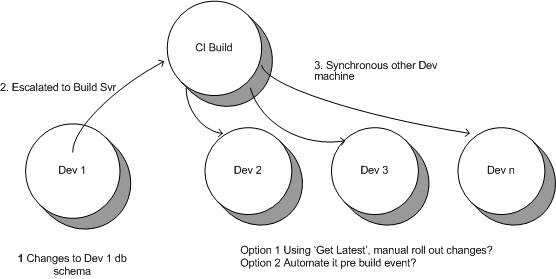
In the normal development lifecycle, database objects (tables, views, stored procedures and etc) evolve as implementation progressed. The despaired changes in each developer’s environment need to aggregate into the central CI build server then cascade to each developer’s environment. Normally this is done manually as there is at lack of source control mechanism for database objects.
What we would like to have is an automated db objects scripting and release processes that we can plug into CC.Net or NAnt build process.

The Requirements:
Iteration one:
1) Automated (SQL Server) database scripting (DBGen.sql)
2) Version control DBGen.sql. – Only update source/roll out changes when new changes are made.
3) Assuming only one development machine is making changes to DB – so there is no need to consider builder server to development machines synchronisation.

Iteration two: SynchronisationSynchronous build server with development machines in a controlled way, i.e. only when a local development tasks has completed (build and tested) and the developer do a ‘Get Latest’ to sync the source code. The contrary to this is whenever changes to build server db is made and tests has been successful, using SQL backup/ replication/publish/subscription (?) mechanism to roll out the changes immediately.

Story break down (iteration one)
1. Post Build Event.
DevEnv (Vs.net) uses post build event to trigger user database schema objects (tables, views, store procedures etc) scripting.
1) Post-build event command line that kicks off the db object scripting. This can be done in two ways:
a. Scpriting (WScript/CScript) with ActiveX object SQLDMO. This option is more fine grain control on what objects to script.
b. Command line executable using SQL Server upgrade facility. Scripts entire database in one go. (Scripting Database Objects has detail introduction.)
2) Check file size (not sum size) on the generated DBGen.sql, auto check out the source control version if there are difference, - but do not check it in yet.

(Developer checks in all changes)
2. Release decision.
Decide whether there is a need to release new db schema by checking the source safe version and time stamp. This process needs to be built into Nant build process.

3. Run DBGen.sql
(If release required) DBGen.sql is executed by Nant using WMI and blah blah blah…
DBGen.sql is run after successful build, before unit tests.